
A meeting with a client often yields a lot of information. Agreements, questions, decisions, and action points all come up. During the conversation, that is not a problem, but afterwards, the real work begins. Who writes the report? What agreements have been made and which action points need to be followed up?
For many organizations, this means that information from a meeting must be processed manually. A recording in one system, a transcript in another application, and then the agreements and tasks back in the ERP or project management system.
At Open2Bizz, we wanted to simplify that process.
Recording a meeting from Odoo
Within Odoo, a lot is already possible. Where standard functionality does not sufficiently align with our way of working, we develop custom solutions. We adhere to a simple thought:
‘If something regularly costs you a lot of time, it can always be easier, faster, and less error-prone.’
This also applies to processing meetings. During client conversations, a lot of information is discussed that needs to be referenced later in projects, tasks, or communication.
There are now many tools that can record meetings and process them with AI. However, using extra tools also means extra connections and systems to manage. Additionally, it is important to handle the data recorded during conversations with care.
That is why we have developed a functionality that allows us to start the recording from Odoo, while the online meeting itself can take place in another environment, such as Microsoft Teams or Google Meet.
The planning starts in the Odoo calendar. From the appointment, the user opens the link to the online meeting. Odoo remains available in the same browser. From the chatter of the relevant appointment, the recording can then be started. After the meeting, you return to Odoo and stop the recording.
In this way, the recording remains directly linked to the correct appointment in Odoo, without the online meeting itself needing to take place in Odoo.
We consciously only record audio. For creating a transcript and summary, video is usually not necessary. This keeps the amount of stored data limited.
From audio to text with Mistral
After the meeting, the recording can be processed from Odoo. For this, we have developed a connection with Mistral.
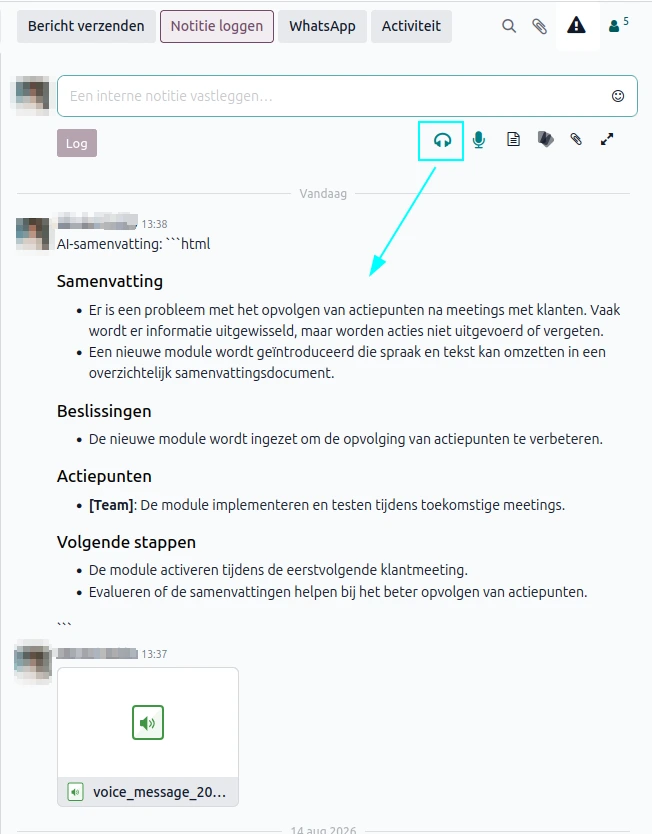
The audio is converted to text and can then be further processed. This allows for, among other things:
the different speakers to be recognized;
the content of the conversation to be transcribed;
a summary to be made;
the information to be stored in the desired place in Odoo (see image).
The user can choose to add the summary or transcript to the chatter of the appointment or place it in a specific field of the relevant record.
This creates a simple workflow:
Meeting → opname → transcriptie → samenvatting → vastlegging in Odoo
Instead of manually working out notes after each meeting, the information remains directly linked to the appointment and thus to the correct client or project file.
From summary to action points
A summary is useful, but ultimately it’s about what needs to happen after a meeting.
What agreements have been made? What action points are there and who needs to pick them up?
This is the next step for us. We want to further use the information from a meeting to automatically recognize action points and convert them into tasks within the linked Odoo project, for example. Then these tasks can be assigned to the right user and processed in the planning.
AI can play an important role in this, but in a controlled manner. The goal is not to add as much AI as possible, but to reduce repetitive work and make information from conversations more usable.
From AI actions to automatic tasks
In addition to creating a transcription and summary, the recognized action points from a meeting can also be directly converted into tasks in Odoo. By using the button 'Create task based on AI actions', you select the desired Odoo project. Then the recognized action points are automatically created as tasks within this project.
After creation, you will receive an overview of the tasks, so you can still check them and delete them if necessary. The original transcription also remains available with the task. This way, you can always find out from which part of the meeting the relevant action point originated.
In this way, the workflow goes one step further: from meeting to transcription, from transcription to action points, and ultimately to concrete tasks.
Customizing Odoo to your own workflow
For us, this functionality clearly shows what is possible when Odoo is adapted to the processes of an organization.
Recording a meeting, creating a transcript, and generating a summary does not have to mean that you need to work with different separate applications. By linking the functionality directly to Odoo, the information remains centrally available and part of the existing workflow.
The modules we have developed for this are Open Source and we are happy to share them with our customers.
Curious about what is possible within Odoo with meeting recordings, transcripts, and AI?
Feel free to contact us.